Near Real Time (NRT) Animal Tagging Location Data Quality Control (QC) Process: Wildlife Computers
Overview
Teaching: 120 min
Exercises: 0 minQuestions
How to receive metadata & data access from a researcher to set up satellite data harvesting
How to use the metadata to create a config file
How to push that config file somewhere so it can be processed regularly by the RT process
How to process a dataset that is no longer real-time - delayed-mode
Objectives
How to receive metadata & data access from a researcher to set up satellite data harvesting for Wildlife Computers tags
Metadata
The minimum metadata required by the QC process is:
- species common name.
- species scientific name.
- release site (e.g., Sable Island).
- release country.
- tag serial number(s) and PTT ID(s).
Use whatever method for obtaining these metadata from the researcher works for you.
Data access
Ensure you have a Wildlife Computers (WC) Portal account & a security key pair set up (see 30_near_time_qc_process). Ask the researcher to setup sharing for their tag datasets via the WC Portal. The data owner(s) will need the email address the node manager used for their WC Portal user account. If the researcher does not know how to do this, refer them to the information on p. 19 in document (p 19).
Once data sharing is setup, within R you can verify access to the researcher’s data via the WC Portal API using the ArgosQC utility function wc_get_collab_ids:
ArgosQC:::wc_get_collab_ids((a.key = "...", s.key = "...")
Where the a.key and s.key values are your WC access and secret key pair. Executing this function with R returns a data.frame of all data owners’ (collaborators) ID’s and email addresses who have set up data sharing with the node manager:
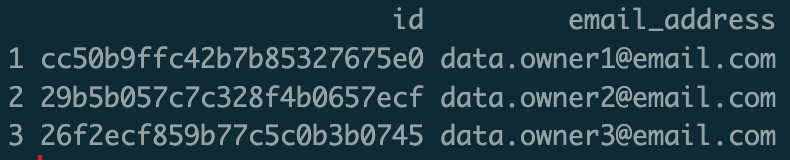 {width=300}
If this function does not return a data.frame (or results in an error) then data sharing has not been setup correctly in the WC Portal and you will need to troubleshoot with the researcher.
How to use the metadata to create a config file
All details for constructing ArgosQC config files are in this Jupyter notebook.
How to push that config file somewhere so it can be processed regularly by the RT process
Details on how to do this are in this Jupyter notebook.
How to process a dataset that is no longer real-time - delayed-mode
Tag datasets that are no longer real-time (deployments have ended) may be processed in the same manner as real-time datasets, except that the QC process only needs to be run once.
Key Points